
Quarantine to release: how QC gates incoming material
Gate pass, receiving note, sampling, testing and approval before a GRN: how a pharma ERP keeps raw material out of stock until QC has released it.
- Author
- ParaTech Product Team
- Published
- Reading time
- 4 min read
In a pharmaceutical plant, material that has arrived is not the same as material that can be used. Between the gate and the store sits quality control: sampling, testing and an approval decision. If the system lets material into usable stock before that decision, sooner or later someone will issue it to production while it is still under test.
ParaTech Pharma ERP closes that gap with a fixed sequence in which stock is only created at the end.
The sequence from gate to stock
- Inward Gate Pass (IGP): the vehicle and material are recorded at the gate, against an approved, open purchase order.
- Receiving Note (RN): the material is received, with quarantine labels and a QR code.
- Quality Inspection (QI): sample → test → check → approve.
- Goods Receipt Note (GRN): only now does the material become stock.
The rule that holds it together: a GRN can only be raised against an approved quality inspection. Rejected quantity goes back out on an Outward Gate Pass marked OGP-Rejected.
Defining what has to be tested
Testing starts with two masters, both of which support Excel bulk import:
- Quality Test Definition: the test, its abbreviation, a standard value, and whether it applies to raw materials, finished goods or both.
- Test Allocation to Products: which tests apply to which item, with the standard value, lower and upper specification limits (LSL/USL) and stage number.
Once tests are allocated, every inspection of that item brings them up automatically. The analyst does not choose which tests to run; the item does.
Sampling
The sample quantity is worked out from the item's sample percentage. Where the sampling step is switched on, the inspection waits at "Sample Received" before results can be entered, so a test result cannot appear before the sample has physically reached the lab.
Result entry: nothing skipped
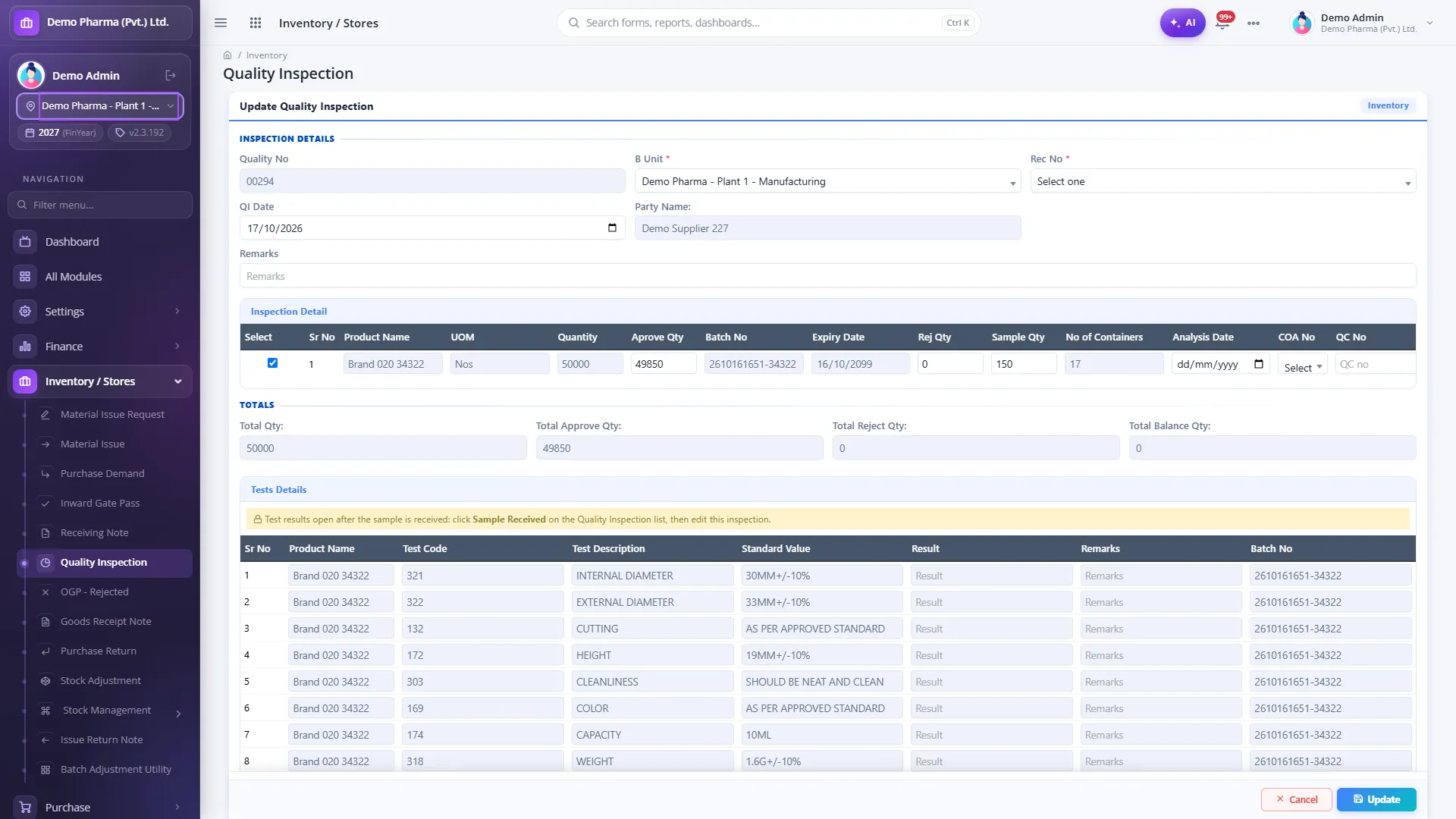
The QC result screen records, per batch:
- Batch number and expiry
- Approved, rejected and sample quantities
- Assay %, which then travels with the batch into production
- QC number, the supplier's CoA reference, analysis and re-analysis dates, and number of containers
- A result for each allocated test, beside its standard value
Two controls apply. The inspection cannot be saved until every allocated test is present, and it cannot be approved while any result is blank. A busy lab cannot approve a lot with a test quietly missing.
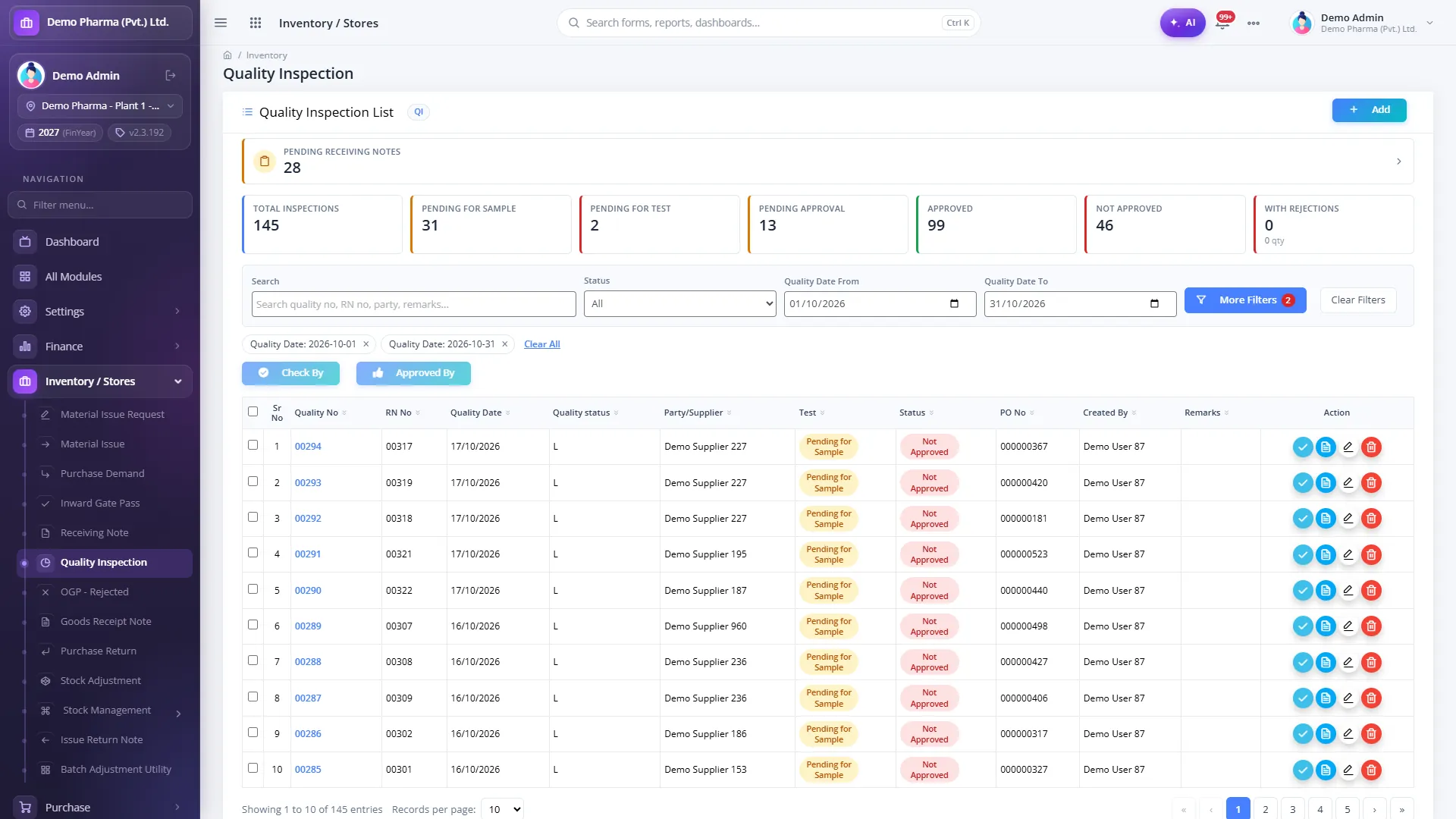
One list for every pending lot
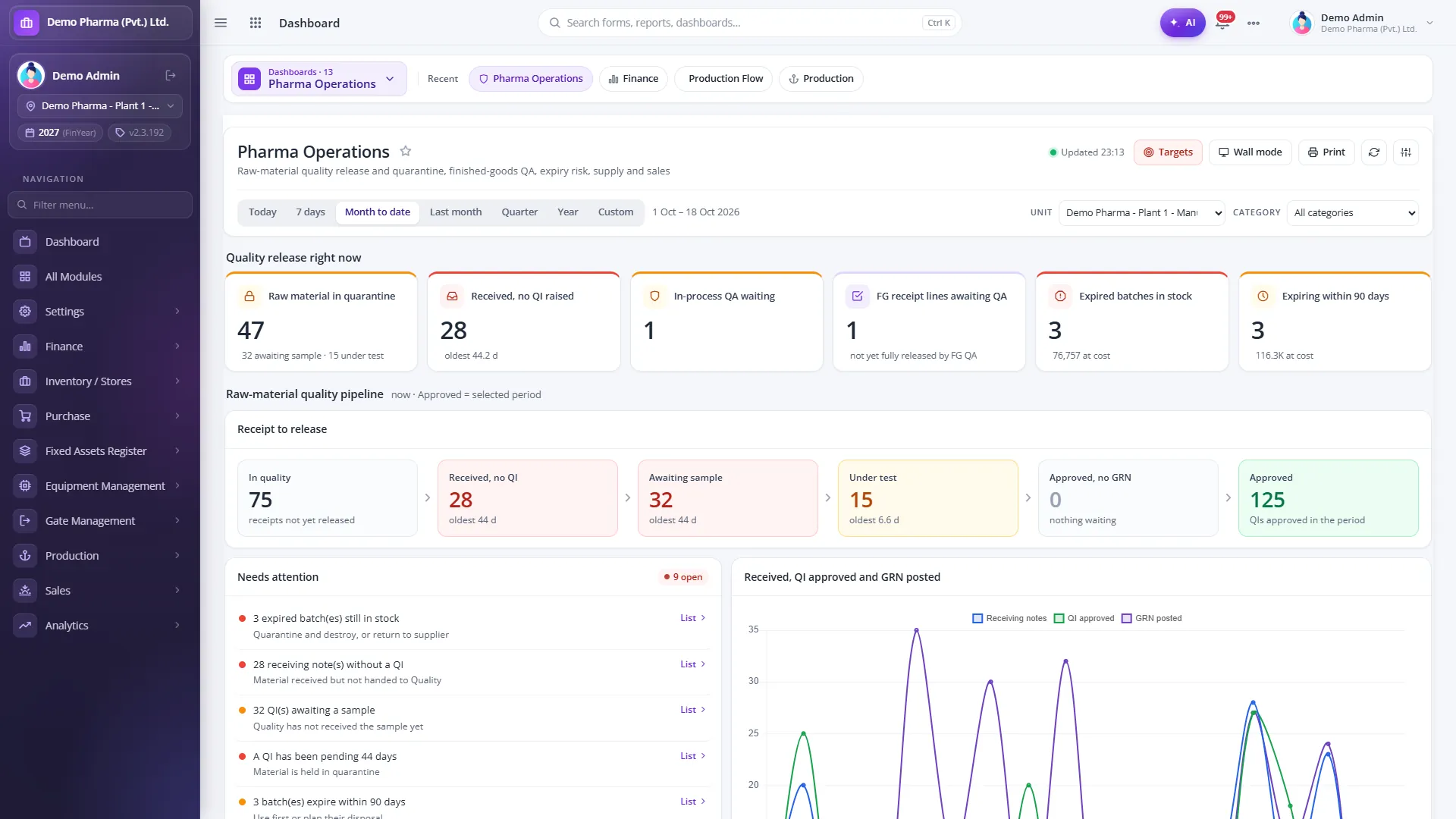
The Quality Inspection list puts work queues at the top: lots waiting for a sample, lots waiting for a test and lots waiting for approval. Each lot shows its status, and authorised users can check and approve in bulk. The Pharma Operations dashboard shows the same pipeline as numbers, with the age of the oldest item at each step: received with no QI raised, awaiting sample, under test, approved but no GRN yet, and approved in the period.
Why the order of documents matters
It is tempting to treat this as paperwork, but the sequence is what makes the control work. Consider what typically happens on paper when production is waiting for a material:
- The material is physically in the warehouse, so someone suggests "issuing it now and completing the QC paperwork later".
- The quarantine label is on the drum, but the stock register already shows the quantity as available.
- A test is still running, but the other results look fine, so the lot is approved "subject to" the last result.
In ParaTech none of these shortcuts is available in the system. Until the inspection is approved there is no GRN, and without a GRN there is no stock to issue. Until every allocated test has a result, there is no approval. The pressure to release early still exists, but it has to be resolved by finishing the work, not by working around the record.
Setting up test templates well
Because the tests on each inspection come from the item, the quality of the setup decides the quality of the control:
- Define each test once, with a clear abbreviation and standard value, and reuse it across items.
- Allocate tests per item with the limits from your approved specification.
- Use the Excel import to load allocations in bulk at go-live, then review them item by item with QC.
- Set each item's sample percentage, so sample quantities are calculated rather than guessed.
Roles and signatures on the print
Quality roles are built from per-form rights: QA sampler, QC analyst, checker and approver. QI prints carry "Analysed by", "Checked by" and "Approved by", and print formats include a sample requisition / QC report and an item-wise QC report.
Beyond incoming material
The same principle, nothing moves until QA says so, applies later in the process:
- In-process QA releases each production stage that needs QC; the next stage is blocked until it does, and the producer cannot release their own stage.
- Finished Goods QA approves or rejects quantity per batch before it becomes saleable stock.
Reports
- Quality Inspection Report and Quality Test Detail
- Sample Receipt Pending and Taken
- Finish Good QA Report
- In-Process QA preview
Questions to ask about QC in any ERP
- Can a GRN, or any stock entry, be made before QC approval? How?
- Who decides which tests are run on an incoming lot: the analyst or the item master?
- Can an inspection be approved with a test result missing?
- Where is assay recorded, and does it follow the batch into production?
- How does rejected material leave the site, and is there a document for it?
Read more on the Quality Control & QA module page, or book a demo and we will run an incoming lot through the gate with your own test templates.
- Quality control
- Quarantine
- QC release
- GRN
- Sampling