
Multi business-unit finance: inter-unit fund transfers under maker-checker
Run plants and branches as business units of one company, with their own books, and move funds between them with one voucher in each unit.
- Author
- ParaTech Product Team
- Published
- Reading time
- 4 min read
Most pharmaceutical groups in Pakistan do not run a single site. There is a manufacturing plant, perhaps a second plant for a different dosage form, a head office, and warehouses or branches that sell. Each wants its own numbers. Head office wants to see the whole picture. And money moves between them every week.
When each unit keeps its own books in a separate system or spreadsheet, inter-unit transfers take days to agree, the two sides rarely match at month-end, and nobody is quite sure which transfer is still "in the air". This article explains how ParaTech Pharma ERP structures multi-unit finance, and how an inter-unit fund transfer moves from draft to reconciled.
Business units inside one company
In ParaTech, a company can have several business units: plants, warehouses or branches. Each unit has its own documents, its own numbering and its own books, while sharing the company's masters.
- Every transaction is tagged to a unit. Documents and voucher numbers run per unit.
- The chart of accounts is shared company-wide and each account is enabled per unit, so the structure stays consistent.
- Users are entitled to units. The sidebar has an office switcher, and the server checks entitlement, so a user only sees the units they are allowed to work in.
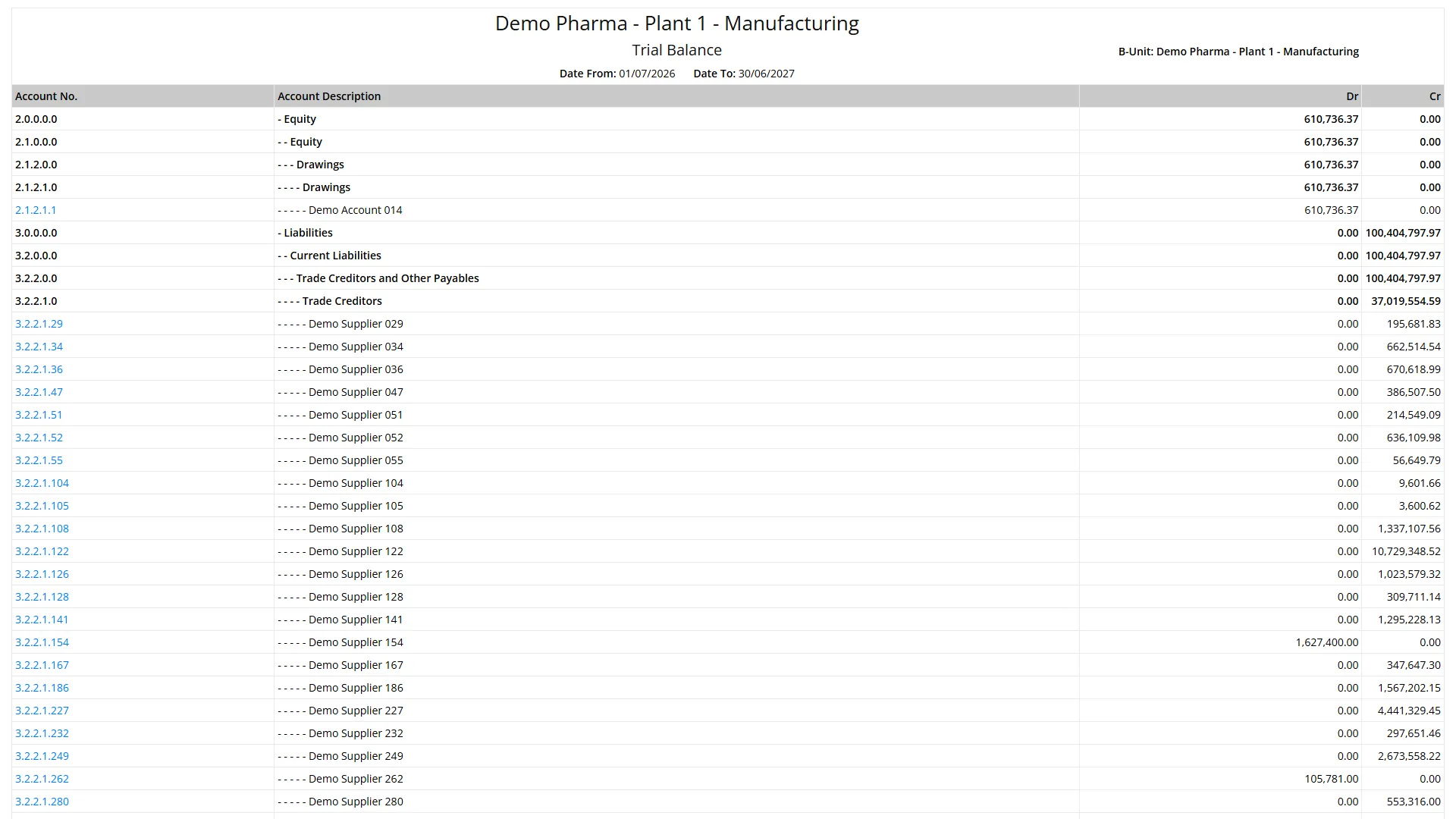
- Listings, production screens and reports are scoped per unit. Dashboards can cover "all my units", and the Trial Balance can be run for one unit or across all units.
The inter-unit fund transfer
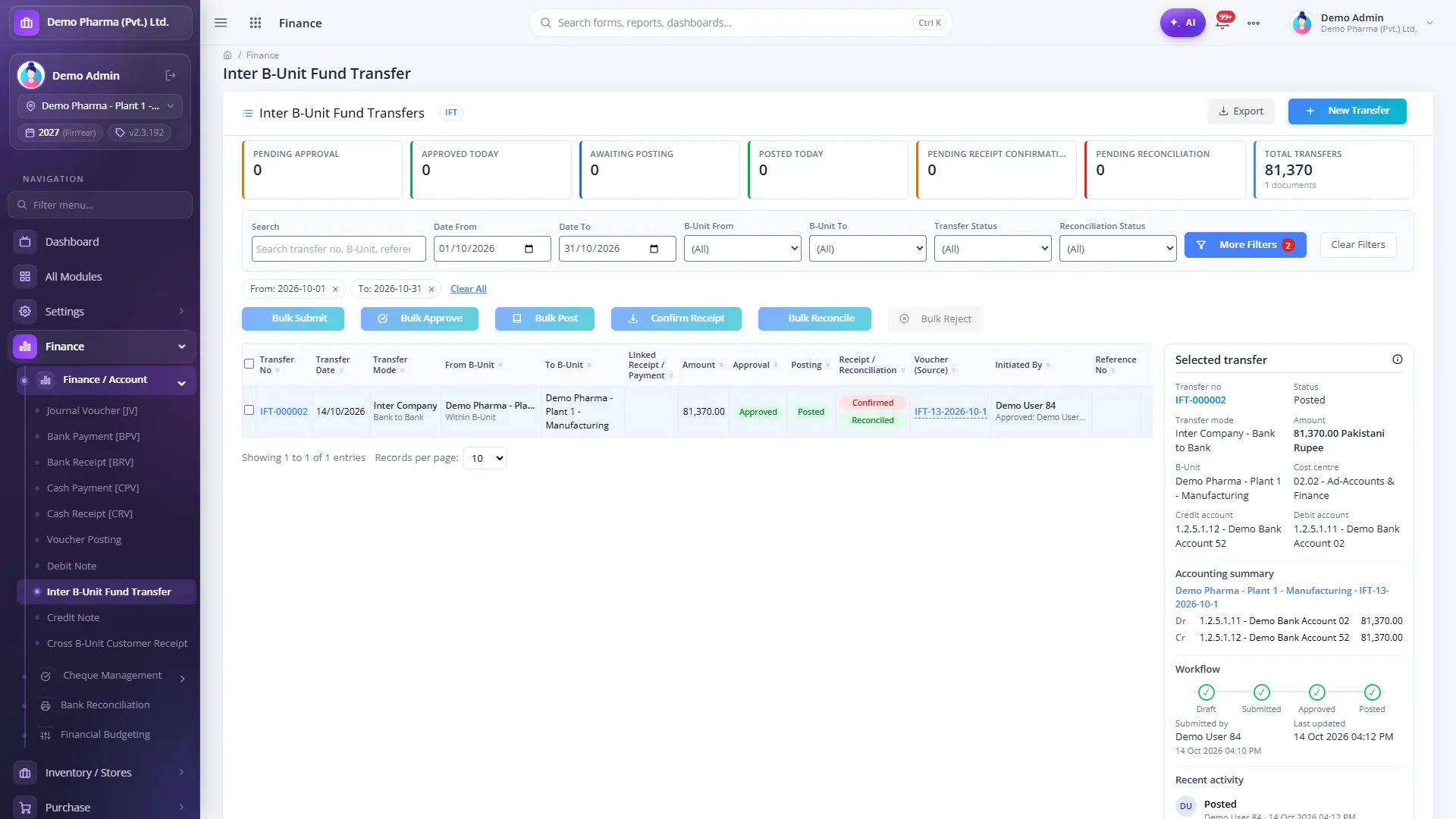
When one unit sends money to another, ParaTech handles it as a single controlled document that passes through clear stages:
- Draft: the sending unit prepares the transfer.
- Submitted: it goes for approval.
- Approved: a different user approves it (maker-checker).
- Posted: the vouchers are created.
- Receipt Confirmed: the receiving unit confirms the money arrived.
- Reconciled: both sides are agreed.
One voucher in each unit
Posting creates one voucher in each unit, so both sets of books are updated from the same document:
- Sending unit: Dr inter-unit receivable, Cr bank.
- Receiving unit: Dr bank, Cr inter-unit payable.
Because both vouchers come from one transfer, there is no second entry to key and nothing to fall out of step. The inter-company account pairs used for these entries are configured once per unit in the Inter Company Accounts Setup, in either Company or Group mode.
Controls built into the document
Treasury and audit teams usually ask the same questions about inter-unit transfers. The controls answer them in the document itself:
- Maker-checker is on by default: the person who prepares a transfer is not the person who approves it.
- No edits after posting. A posted transfer is corrected with Reverse, which posts mirror vouchers, so the history is never overwritten.
- Soft delete with a reason, rather than records disappearing.
- Proof attachment, for the bank advice or transfer slip.
- A full activity trail per transfer, and CSV export for treasury and audit.
Customer receipts banked by another unit
A common real-world case: a customer of Plant 1 pays into a bank account held by head office. ParaTech handles this with a Cross B-Unit Receipt. The owning unit verifies the receipt, both units post, the owner knocks the customer's invoices off, and the balance between the units is then settled with a fund transfer. A vendor-payment variant uses the same document when one unit pays another unit's supplier.
An approval board for inter-unit finance
The Inter B-Unit Finance dashboard shows what is waiting at each stage: transfers awaiting approval, receipts awaiting confirmation, and the vouchers each unit has posted, side by side. Finance managers work the queue from one screen instead of chasing e-mails.
The ledger behind it: automatic vouchers
Inter-unit transfers are one part of a ledger that mostly fills itself. Operational documents post their own vouchers, including sale invoices and returns, purchase invoices and returns, GRN accruals, material issues, stock adjustments, stock transfers, FG QA release, bills of entry, debit and credit notes, fixed-asset events and the salary journal from ParaTech HRMS. Automatic voucher types cannot be keyed by hand. Manual vouchers go through Check → Approve → Post, within role-wise approval amount limits per voucher type.
Setting it up
A few decisions at implementation time shape how well multi-unit finance works day to day:
- Decide what a business unit is. Usually each plant, and each warehouse or branch that keeps its own books, is a unit.
- Configure the inter-company account pairs for fund transfers, customer receipts and vendor payments in each unit before the first transfer.
- Grant the inter-unit screens deliberately. Menu rights for these screens are set up per client, so decide who prepares, who approves and who confirms receipt.
- Set approval limits by role for each voucher type, so larger amounts go to more senior approvers.
Questions to ask about multi-unit finance
- When funds move between units, how many people key an entry, and in how many systems?
- Can the receiving unit confirm receipt in the system, or does it happen by phone?
- How is a wrong transfer corrected: by editing, or by a reversal that leaves a trail?
- Can a user be restricted to their own unit's documents?
- Can you run a trial balance for one plant on its own, and for all units together?
Read more on the Finance & Multi-Unit module page, or request a demo set up with your own units and approval chain.
- Multi-unit
- Inter-unit transfer
- Maker-checker
- General ledger