
FBR Digital Invoicing for pharma distribution
How FBR Digital Invoicing fits into a pharma order-to-cash flow: sale order, FEFO dispatch, invoice with DI number and QR, and recovery.
- Author
- ParaTech Product Team
- Published
- Reading time
- 4 min read
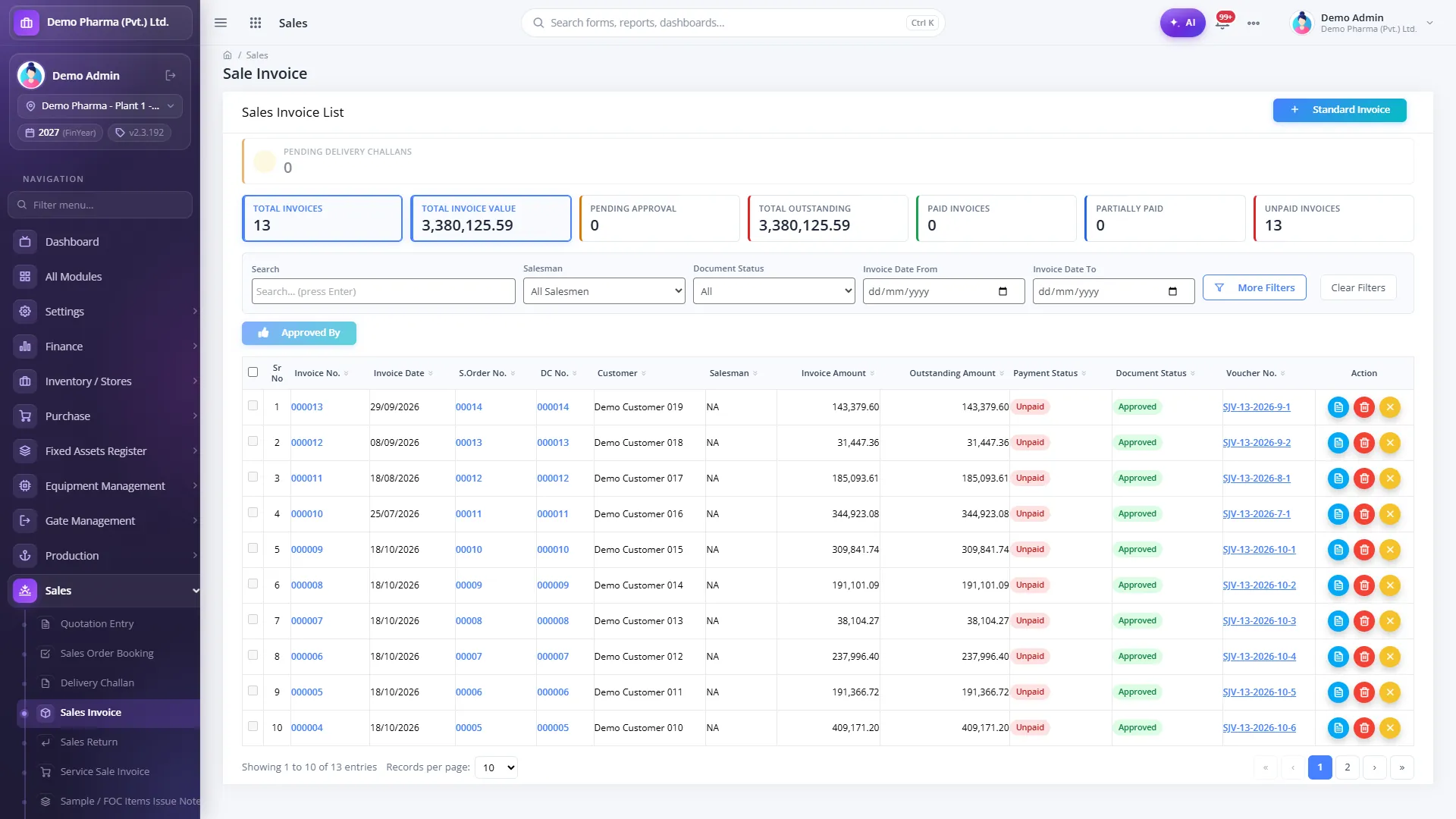
For a pharmaceutical company selling to distributors, institutions and pharmacies in Pakistan, the sale invoice is both a commercial document and a tax document. FBR's Digital Invoicing requires invoices to be reported to FBR and to carry the identifier it returns. When that step sits outside the ERP, someone has to re-key invoices into another tool, and the two records drift apart.
ParaTech Pharma ERP posts sale invoices to FBR Digital Invoicing from the invoice itself. This article explains where that step sits in the order-to-cash flow, and what else the flow needs to be right for pharma.
Order to cash in five steps
- Sale Order: entered directly or imported from Excel. Orders taken in the field through the PT-Bizz mobile app land in the same list.
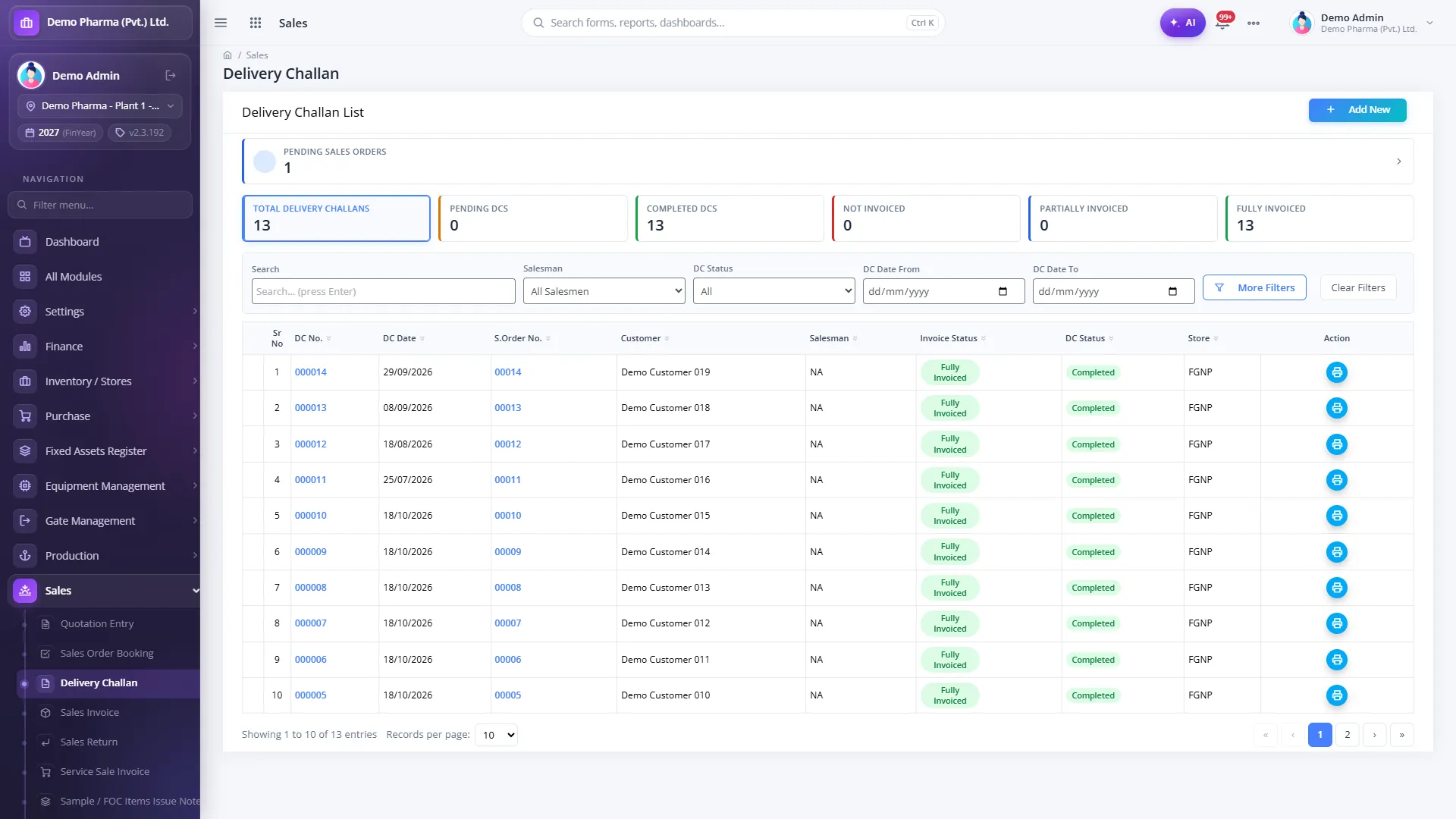
- Delivery Challan: stock leaves the store, with batches allocated earliest expiry first.
- Sale Invoice: raised directly or from the challan; it posts its voucher and is posted to FBR Digital Invoicing.
- Sales Return: against the original invoice.
- Recovery: a receipt voucher or Recovery Record Keeping entry, with invoice knocking.
Each step moves either stock or money, and each posts its own accounting entry.
FBR Digital Invoicing on the sale invoice
When a sale invoice is posted to FBR Digital Invoicing, the DI number returned by FBR and a QR code are printed on the invoice. The sale invoice list shows an FBR posting column, so billing can see at a glance which invoices have been reported. There are around twenty invoice print formats, including a pharma sales-tax invoice.
Where a company reports to the Punjab Revenue Authority instead, PRA POS integration is available and switched on per company. Each company works with one e-invoicing authority.
The customer master behind a correct invoice
A tax invoice is only as good as the customer data it draws on. ParaTech's customer master records, for each customer:
- NTN and STRN
- Further tax and withholding tax settings
- Drug-licence numbers and expiry dates
- Credit amount and credit days
- Region, area and city, with the salesman, RSM and ARSM
- Block and distributor flags
- Discount, bonus and default products, each on its own tab
Dispatch from released stock, earliest expiry first
For pharma, the invoice should only ever cover stock that QA has released. In ParaTech, finished goods reach the saleable store only through FG QA release, and the delivery challan allocates batches from that released stock using FEFO. The batch numbers on the challan and invoice are therefore the batches that actually left the warehouse.
Sales-force structure and restrictions
The sales-force hierarchy runs Director → RSM → ASM → Sales Executive → Medical Rep, with salesman commission definition and payment. A sales executive sees only their own customers. Tenders and institutional sales are handled with Tender, Technical and Financial Bid, Bid Security, Bank Guarantee and E-Stamp documents.
Recovery and ageing
Collection is where the order-to-cash cycle is won or lost. ParaTech records recovery through receipt vouchers or Recovery Record Keeping, from the web or the mobile app, and knocks receipts off against invoices. The reports finance and sales managers use include:
- Receivable Ageing, detail and summary
- Customer Ledger and Customers Receivables
- Recovery, Salesman-wise Recovery and Sales & Recovery
- Invoice Knocking
- Sales Register and Sales GST Detail / Summary
- Product-wise and Salesman-wise Sales
The Sales dashboard shows approved sales, collections, receivables and the recovery ratio, and the Tax/FBR dashboard covers the tax side.
Distributors' stock and sell-out
Invoicing a distributor is not the same as selling to a patient. For companies that want to see what distributors hold and sell, ParaTech's secondary sales features sync supply from challans and invoices, and distributors can enter daily sell-out through a Distributor Portal or a signed Excel import. Both are switched on per company.
Preparing for go-live with digital invoicing
Most of the work of moving to digital invoicing is in the data, not the software. Before the first live invoice:
- Clean the customer master. Check NTN and STRN for every registered customer, and set further tax and withholding tax correctly. Errors here appear on every invoice.
- Check the product master. Tax treatment, units and pack sizes should be right before invoices are reported.
- Choose the invoice print format. Agree which of the available layouts your billing team and customers will use, and confirm the DI number and QR code appear where expected.
- Test end to end. Run real scenarios, sale order to challan to invoice to return, with your own customers and products before the cutover date.
- Agree who watches the posting column. Someone in billing should own the list of invoices that have not yet been posted, and clear it daily.
A checklist for FBR-ready invoicing
- Is the invoice posted to FBR from the ERP, or re-keyed elsewhere?
- Does the printed invoice carry the DI number and QR code?
- Can you see which invoices have and have not been posted?
- Are NTN, STRN and further-tax settings held on the customer, not typed on each invoice?
- Does the invoice post its own accounting voucher?
See the full flow on the Sales & Distribution module page, or request a demo of order-to-cash with FBR posting.
- FBR
- Digital invoicing
- Sales tax
- Order to cash