
Tracing a batch through the document chain
How the Item Status Report, the stock ledger by batch and near-expiry reporting let you follow material from purchase demand to issue in a pharma plant.
- Author
- ParaTech Product Team
- Published
- Reading time
- 4 min read
"Where is this material, and how did it get there?" It is a question that comes from a production planner chasing a late lot, from a QA head preparing for an inspection, and from finance trying to explain a stock difference. In a plant where each department keeps its own register, answering it means walking from office to office.
In ParaTech Pharma ERP every step is a linked document on the same database. This article shows how to follow material through that document chain, and which reports do the work.
The purchase-to-issue document chain
Raw and packing material moves through a fixed sequence of documents, each created from the one before:
- PD: Purchase Demand
- PO: Purchase Order
- IGP: Inward Gate Pass
- RN: Receiving Note
- QI: Quality Inspection
- GRN: Goods Receipt Note
- MIR: Material Issue Request
- MI: Material Issue
Because each document is created from the previous one, the links are recorded by the system as the work is done. Nobody has to cross-reference document numbers afterwards.
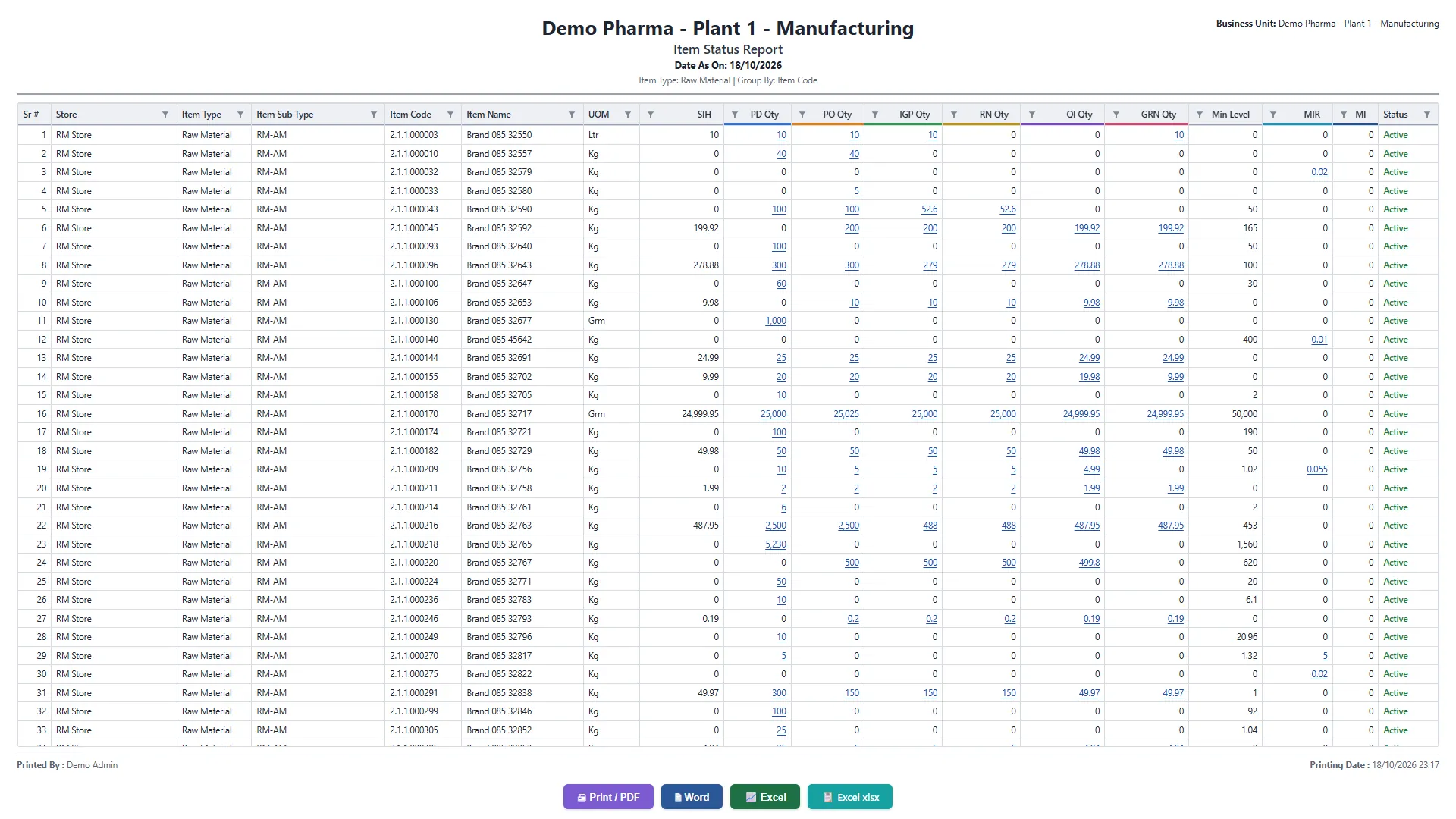
The Item Status Report: one item, every document
The Item Status Report lays that chain out on one line per item: the quantity at PD, PO, IGP, RN, QI, GRN, MIR and MI. Reading across, you can see exactly where material is held up. Ordered but not yet at the gate? Received but no QI raised? Approved by QC but not yet on a GRN? The gap between two columns is the answer.
The Purchase Demand list shows the same chain from the buyer's side: each demand carries the numbers of its PO, gate pass, receiving note, QI, GRN and purchase invoice.
Following one batch: the stock ledger
Once material is in stock, the Stock Ledger filtered by batch lists every movement of that batch with the document that caused it: the GRN that received it, the transfers between stores and units, the material issues to production, the returns and adjustments. Together with the quality inspection reports for the batch, this gives the history an auditor typically asks for.
Related reports fill in the rest of the picture:
- Stock In Hand With Value, batch-wise, store by store
- Batch-wise Stock and Consumption with Value
- Quality Inspection Report and Quality Test Detail
- Bin Card and Daily Stock In / Out
Finished goods: batch on every dispatch
On the sales side, delivery challans allocate finished-goods batches from QA-released stock, earliest expiry first, so each challan and invoice records which batch went to which customer. The finished-goods batch itself comes from a manufacturing order that carries its BOM version, and the materials issued to it are recorded against that order.
Near expiry: tracing what is about to become a problem
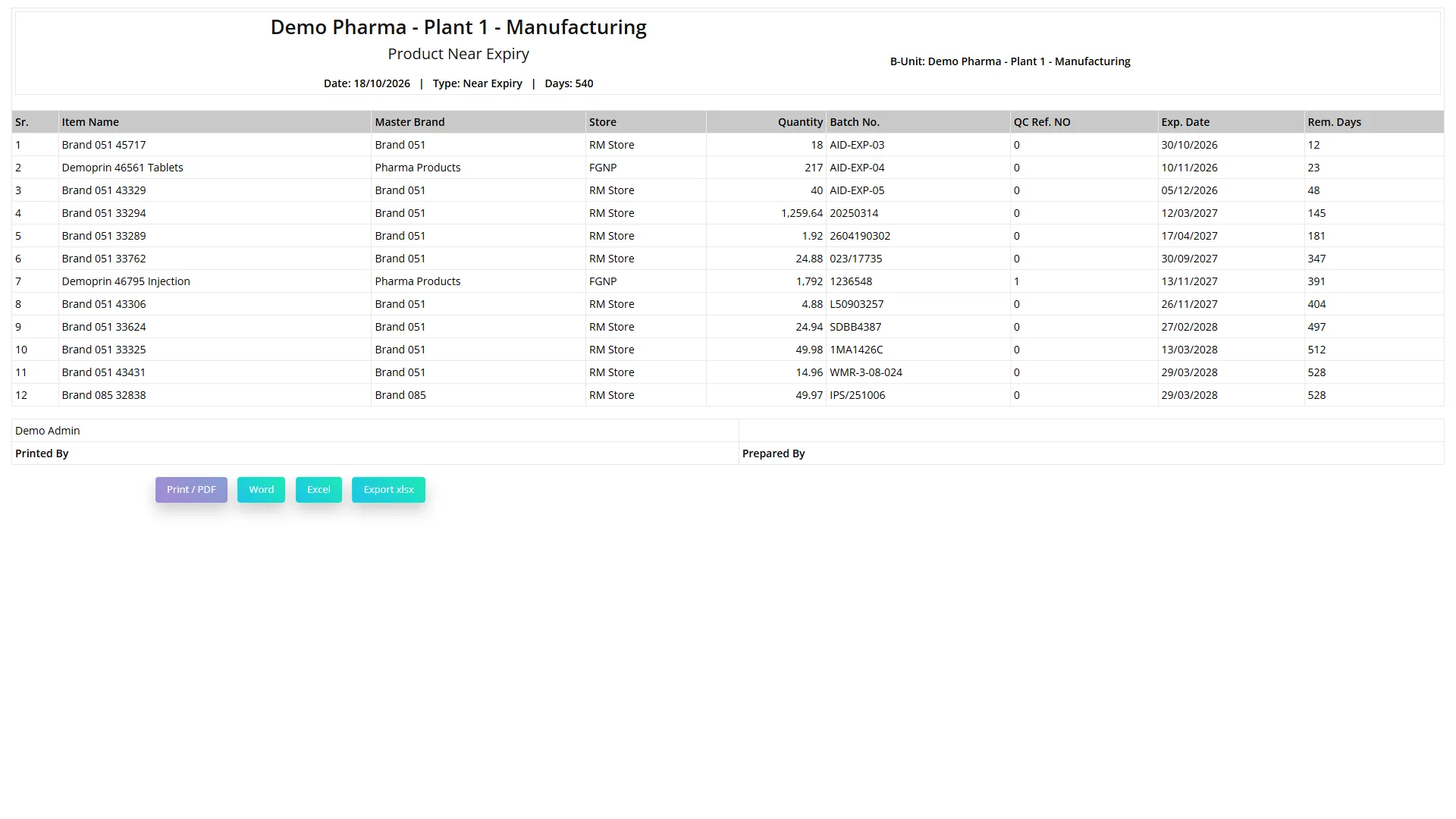
Traceability is not only about the past. The Product Near Expiry report lists batches by store with their expiry date and remaining days, earliest first. The Pharma Operations dashboard shows expired batches still in stock and batches expiring within 90 days, with their value at cost.
Three questions the chain answers quickly
"Why hasn't my material arrived in stock?"
Open the Item Status Report for the item. If the IGP and RN columns show quantity but the GRN column does not, the material is on site and waiting for quality control. The QI column tells you whether an inspection has even been raised, and the Quality Inspection list tells you whether it is waiting for a sample, a test or an approval.
"Which lot of this material did production use?"
The material issue records the batch, chosen earliest expiry first. Filter the stock ledger to the batch and every issue against it is listed with its document.
"How much of this batch is left, and where?"
Stock In Hand With Value, batch-wise, shows the remaining quantity and value of each batch per store, with its expiry date.
Being precise about what this gives you
This is a document-chain trace: every movement is a linked document, and the reports above let you follow material forward from demand to issue, and back from a batch to its receipt and inspection. It is worth being clear with your team, and with any vendor you evaluate, about the difference between that and a single consolidated "recall report" that lists every customer and raw-material lot for a finished batch on one page. Ask any vendor to show you the exact steps for your recall scenario, live, on their own system.
Questions to ask about traceability
- Are documents created from each other, or keyed separately and matched later?
- Can you see, for one item, how much is at each step from demand to issue?
- Can the stock ledger be filtered to a single batch?
- Is the batch recorded on every dispatch document, and chosen by the system?
- For a recall, what are the exact steps, and how long do they take on real data?
See more on the Inventory & Warehouse module page, or book a demo and we will trace a batch on the demo data in front of you.
- Traceability
- Batch tracking
- Stock ledger
- Document chain